REST API
The documentation of the api can be found in Api Docs page.
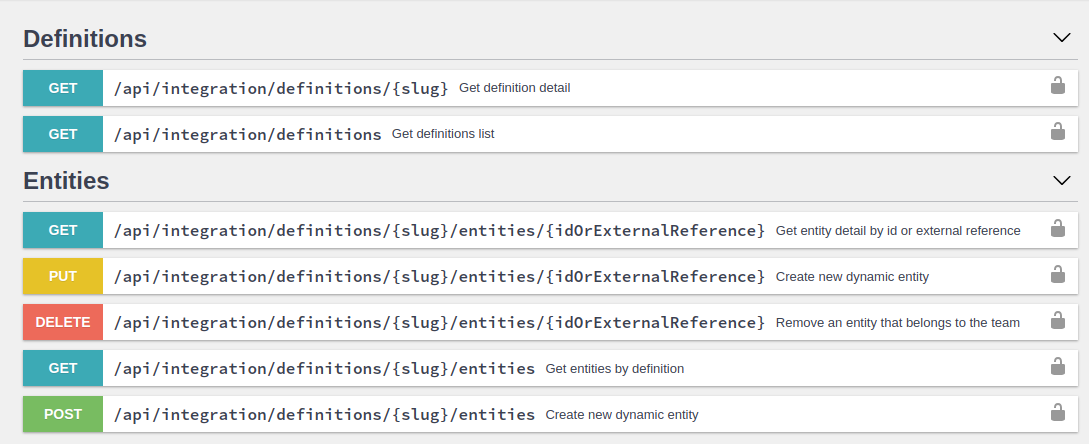
This article defines the resources available in the TicTAP integration API. I you need to understand the Data model that TicTaP uses you can read the data model
Access
Team member login
If you need to authenticate as a team member with username and password, use the Core auth endpoint:
POST /api/login
Content-Type: application/json
Request body:
{
"password": "your-password"
}
username must contain the member email.
You can also optionally include a team_slug when the member belongs to more than one team and you want to force the login against a specific team:
{
"password": "your-password",
"team_slug": "my-team"
}
Example response:
{
  "access_token": "<jwt_access_token>",
  "refresh_token": "<refresh_token>",
  "ttl": 3600,
  "team_slug": "my-team"
}
Fields:
access_token: JWT used in authenticated requestsrefresh_token: token used to request a new JWTttl: remaining lifetime of the access token, in secondsteam_slug: resolved team slug for the issued token
Refresh JWT
To obtain a new access token from a refresh token, use:
POST /api/refresh-token
Content-Type: application/json
Request body:
{
  "token": "<refresh_token>"
}
Example response:
{
  "access_token": "<new_jwt_access_token>",
  "refresh_token": "<refresh_token>",
  "ttl": 3600,
  "team_slug": "my-team"
}
Using the token in requests
Once you have an access token, include it in requests as a header:
AccessToken: <jwt_access_token>
The current authenticator also accepts:
Authorization: <jwt_access_token>
Access token
In order to access the API it is required having an accessToken. Once you have an accessToken you must include it in every request as a HTTP header
AccessToken: "AccessToken"
If you need to try different API calls you can do it from the same Api Docs page, by using the "authorize" button

Definitions
When using the integration API, you must first understand which definitions are available and which fields are available for each definition. Once you have that information then you can use it to create or update Entities that have those definitions
Listing definitions
You can get the list of available definitions by calling the endpoint:
GET /api/integration/definitions
This endpoint returns a list of definitions available in your Enterprise. Each definition has a name property that identifies the definition, a slug property that is a unique identifier for the definition, and a fields property that is a list of fields.
This is a response example:
{
  "pages": 11,
  "total": 51,
  "results": [
    {
      "name": "Fire extinguisher co2 5kg",
      "slug": "fire-extinguisher-co-2-5-kg"
    },
    {
      "name": "Ventilació extractors",
      "slug": "ventilacio-extractors"
    },
    {
      "name": "Facility",
      "slug": "facility"
    },
    {
      "name": "Bie",
      "slug": "bie"
    },
    {
      "name": "Pump",
      "slug": "pump"
    }
  ]
}
In the above example, there a list of 51 definitions , but only 5 are returned. This is because the endpoint returns the definitions in pages of limit elements. If you want to get the next page you can use the page parameter:
?page=1&limit=5
The total amount of pages is always returned in the pages parameter
Getting a definition detail
In order to get the list of fields that a given definition has, it is necessary to make a request to get the detail for a given definition slug.
GET /api/integration/definitions/{slug}
This is an example:
GET /api/integration/definitions/bie

// Response:
{
  "name": "Bie",
  "slug": "bie"
  "fields": [
    {
      "type": "text",
      "name": "Model",
      "required": false,
      "indexable": true,
      "slug": "model",
      "localized": false
    },
    {
      "type": "text",
      "name": "Product reference",
      "required": false,
      "indexable": true,
      "slug": "product-reference",
      "localized": false
    },
    {
      "type": "date",
      "name": "Date",
      "required": false,
      "indexable": false,
      "slug": "date",
      "localized": false
    },
    {
      "type": "text",
      "name": "Location",
      "required": false,
      "indexable": false,
      "slug": "location",
      "localized": false
    }
  ]
}
Every field has a slug, which identifies it uniquely and it will be used when creating/editing entities of that given definition.
Every field also has a type that defines the type of data that is stored in that field: text, choice, media, media_collection ... You can find a reference of all field types
in the data model
Entities
Create an entity
Once we know the definition we can create an entity for that definition:
POST /api/integration/definitions/{slug}/entities
This is an example when creating an entity for the definition bie:
POST /api/integration/definitions/bie/entities

// Request body:
{
    "name": "Bie 1",
    "values": {
      "model": "Model 1",
      "product-reference": "Product reference 1",
      "date": "2020-01-01",
      "location": "Location 1"
    }
}
When some of the fields is of type media or media_collection ( e.g. documents ) , the request must use the multipart/form-data content type and the value of the field must be a file.
In the following example, the field documents is of type media_collection and it is a list of files. The field photo is of type media and it is a single file.
POST /api/integration/definitions/bie/entities

AccessToken: {AccessToken}
Content-Type: multipart/form-data; boundary=----WebKitFormBoundary

------WebKitFormBoundary
Content-Disposition: form-data; name="name"

Bie 1
------WebKitFormBoundary
Content-Disposition: form-data; name="values[model]"

Model 1
------WebKitFormBoundary
Content-Disposition: form-data; name="values[photo]"
Content-Type: image/png

< /home/debian/pictures/photo.jpeg
------WebKitFormBoundary
Content-Disposition: form-data; name="values[documents][]"; filename="document1.png"
Content-Type: image/png

< /home/debian/documents/document1.pdf
------WebKitFormBoundary
Content-Disposition: form-data; name="values[documents][]"; filename="document2.pdf"
Content-Type: image/jpg

< /home/debian/documents/document2.pdf
------WebKitFormBoundary--
Update an entity
When updating a given entity, the request is the same as when creating an entity, but the method is PUT and the endpoint is:
PUT /api/integration/definitions/{slug}/entities/{id}
The entities id are UUIDs. This is an example when updating an entity for the definition bie:
PUT /api/integration/definitions/bie/entities/a3f4509a-6060-4526-9bae-4a2cbd8f52b5

// Request body:
{
    "name": "Bie 1 updated",
    "values": {
      "model": "Model 1 updated",
      "product-reference": "Product reference 1",
      "date": "2023-01-02",
      "location": "Location 1"
    }
}
Delete an entity
When deleting a given entity, the request is a DELETE request to the endpoint:
DELETE /api/integration/definitions/{slug}/entities/{id}
External reference
When creating or updating an entity, it is possible to add an external reference to the entity. This is useful when you want to link the entity with an external system. For example, if you have SAP and you want to link the entity with a given SAP object, you can add the SAP object id as an external reference.
The external reference is a string that must be unique for the given definition. This means that if you create an entity with an external reference, you cannot create another entity with the same external reference.
The external reference is added to the entity in the external_reference field. For example:
POST /api/integration/definitions/bie/entities

// Request body:
{
    "name": "Bie 1",
    "external_reference": "SAP-1234",
    "values": {
      "model": "Model 1",
      "product-reference": "Product reference 1",
      "date": "2020-01-01",
      "location": "Location 1"
    }
}
A external reference can be updated when updating an entity. For example:
PUT /api/integration/definitions/bie/entities/a3f4509a-6060-4526-9bae-4a2cbd8f52b5

// Request body:
{
    "name": "Bie 1 updated",
    "external_reference": "SAP-UPDATED-1234",
    ...
}
IMPORTANT: when updating an entity and the external_reference is not informed, or it is empty, the current external reference is removed from the entity.
Entity's "parent"
When creating or updating an entity, it is possible to add a "parent" to the entity. The parent refers to the higher level entity that contains the entity. For example, if you have a definition facility and a definition room, the room entity can have a parent that is a facility entity.
To express this through the API you can add the parent_id field to the entity.
For example:
POST /api/integration/definitions/room/entities

// Request body:
{
    "name": "Room 1",
    "parent_id": "a3f4509a-6060-4526-9bae-4a2cbd8f52b5"
    ...
}
and it is also possible to use the "external reference" of the parent entity:
POST /api/integration/definitions/room/entities

// Request body:
{
    "name": "Room 1",
    "parent_id": "SAP-FACILITY-1234"
    ...
}
This can also be accomplished when updating an entity, which causes a "move" of the entity to another parent. For example:
PUT /api/integration/definitions/room/entities/room-uuid

// Request body:
{
    "name": "Room 1",
    "parent_id": "SAP-ANOTHER-FACILITY"
    ...
}
IMPORTANT: It is NOT possible to leave an entity "orphan". When updating an entity and the parent_id is not informed, or it is empty, the current parent will remain unchanged.